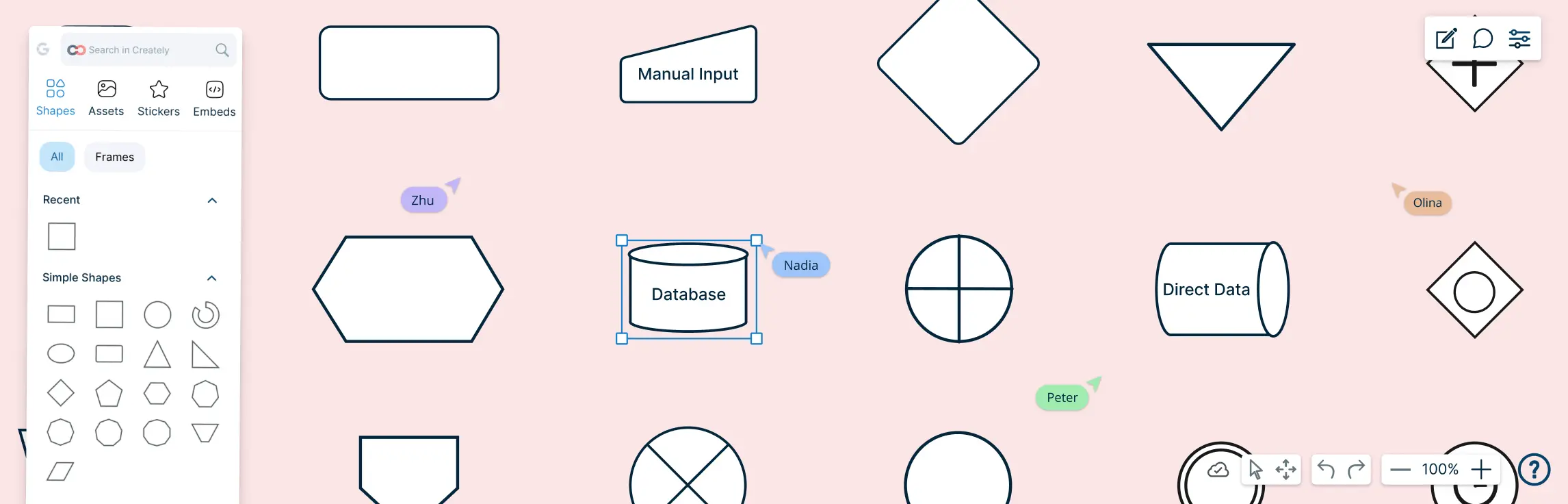
Process mapping symbols are the visual building blocks used to map how work gets done. From simple tasks and decisions to complex workflows, the process map shapes help teams turn scattered steps into clear, easy-to-follow diagrams. In this guide, we’ll explore the most common process icons, what they mean, and how to use them effectively.
What Are Process Mapping Symbols?
Process mapping symbols are standardized shapes used to represent the components of a process within a diagram. Each symbol has a specific meaning, providing a universal language that enables process designers and teams to map out workflows accurately and efficiently. Using process mapping symbols simplifies communication among team members, stakeholders, and external collaborators by providing a clear visual representation of even the most complex workflows. They are essential for improving process efficiency, identifying bottlenecks, and ensuring that all team members have a shared understanding of the workflow.
Flowchart Symbols Overview
Flowchart symbols are powerful visual tools used to represent the sequence, decisions, inputs, and outputs of a process. They serve as the building blocks for creating clear and logical diagrams that can be easily understood by stakeholders across different roles and departments. By using these standardized symbols, businesses can map out workflows, identify inefficiencies, and communicate processes effectively. While flowchart symbols are widely used for general process mapping, they also provide a foundation for more advanced diagrams in process optimization and documentation.
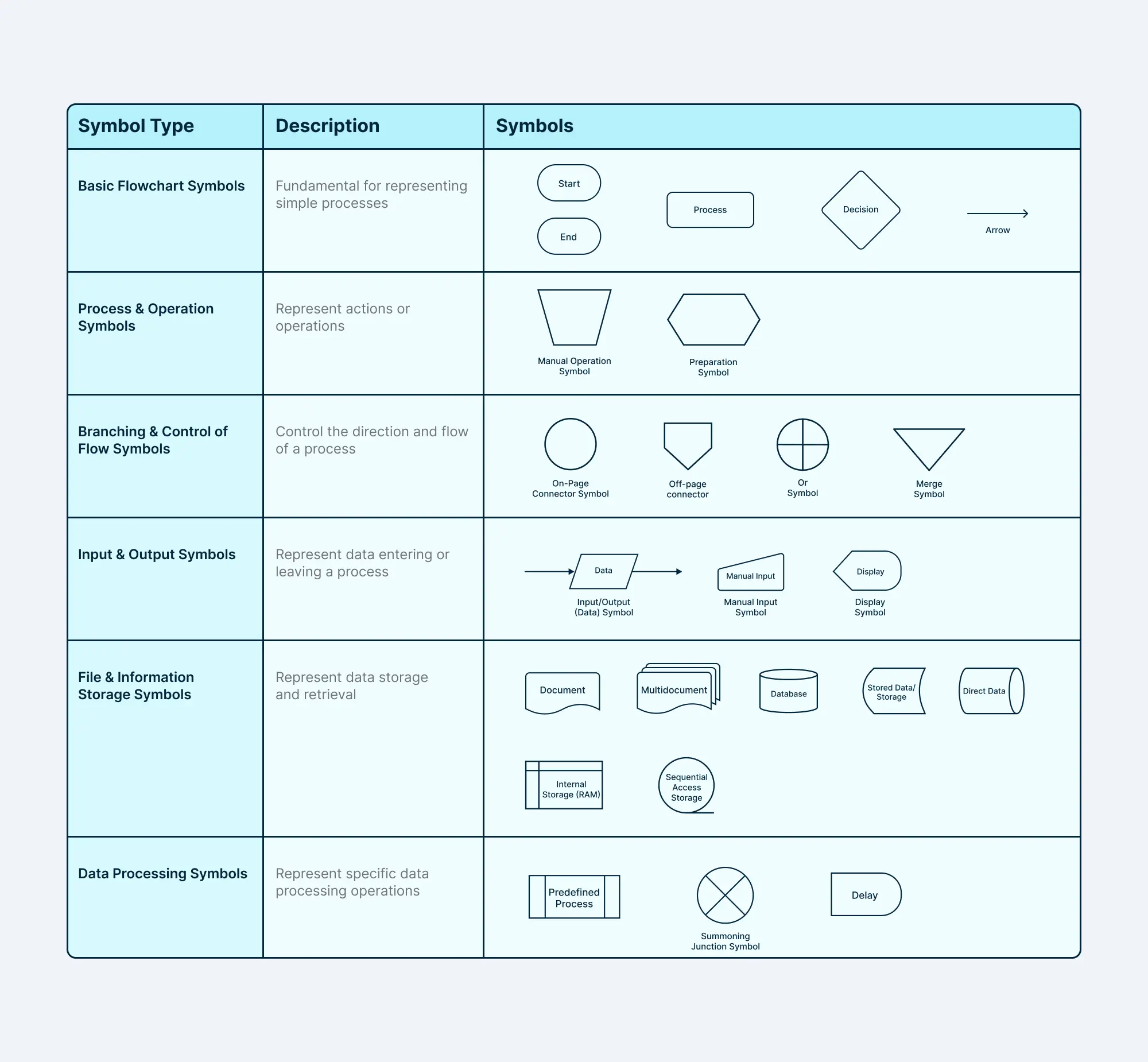
Basic Flowchart Symbols
- Start/End (Oval or Circle): Marks the beginning and end points of a process. These symbols help identify the entry and exit points in a process, making them essential for clearly defining the scope of the workflow.
- Process (Rectangle): Represents an activity or task within the process. This is the most commonly used symbol in flowcharts, used to denote steps or actions that need to be performed during the process.
- Decision (Diamond): Indicates a decision point where the process can branch based on conditions. Helps illustrate where the process flow diverges depending on the outcome of a decision, such as “yes/no” or “true/false.”
- Arrow: Depicts the direction of the flow of the process. Arrows guide the viewer through the steps, ensuring they understand the order of tasks.
Process & Operation Symbols
These process mapping symbols represent specific actions or operations in a process. They outline the tasks, activities, or steps involved in a process. For example, a process flowchart for a software development project might use these process mapping symbols to show steps like “code review,” “testing,” and “deployment.”
- Manual Operation Symbol: Indicates a manual operation or task performed by a person.
- Preparation Symbol: Represents an initial setup or preparation step before the main process begins.
Branching & Control of Flow Symbols
These process mapping symbols control the direction and flow of a process. They determine the next step based on certain conditions or decisions.
- On-Page Connector Symbol: Links different parts of a flowchart on the same page.
- Off-Page Connector/Reference Symbol: Links different pages of a flowchart.
- Or Symbol: Indicates that one of the multiple paths can be followed.
- Merge Symbol: Combines multiple flowlines into a single path.
Input & Output Symbols
These symbols represent the data that enters or leaves a process. They show how information is fed into a process and how results are generated. For example, a flowchart for an order processing system might use input symbols to represent customer orders and output symbols to represent invoices.
- Input/Output (Data) Symbol: Represented as a parallelogram and often distinguished by labeling, the Data symbol specifically highlights input/output operations, such as user input, reports, or system-generated outputs.
- Manual Input Symbol: This trapezoid-shaped symbol indicates where human intervention is required to input data or perform an action manually, emphasizing steps where automation may not be present.
- Display Symbol: Represents the display of information, such as on a monitor or printer.
File & Information Storage Symbols
These process mapping symbols represent the storage and retrieval of data. They show where data is kept and how it’s accessed.
- Document/ Documents Symbol: Represents a document or report.
- Database Symbol: Represents a database or data repository.
- Stored Data/Storage Symbol: Represents general storage of data.
- Direct Data Symbol: Represents data that is directly accessed, such as from a register or memory location.
- Internal Storage Symbol: Represents data stored within a process or system.
- Sequential Access Storage Symbol: Represents data stored in a sequential manner, such as on a tape drive.
Data Processing Symbols
These symbols represent specific data processing operations or subroutines. They show how data is manipulated and transformed. For example, a flowchart for a payroll system might use these process mapping symbols to represent calculations like gross pay, taxes, and net pay.
- Predefined Process/ Subroutine: Represents a process or subroutine that is defined elsewhere.
- Summoning Junction Symbol: Indicates a point where a subroutine is called.
- Delay Symbol: Represents a delay or wait in the process.
Benefits of Standardized Process Mapping Symbols
Using standardized process mapping symbols offers numerous advantages that go beyond creating visually appealing diagrams. These process mapping symbols provide a universal framework for representing workflows, ensuring consistency, accuracy, and clarity across various teams and organizational levels. Here’s why standardized notations are indispensable:
Improved Clarity
Standardized process mapping symbols offer a clear and universally understood representation of steps, decisions, and workflows. By using these process mapping symbols, teams can reduce misunderstandings and ambiguities, making complex processes easier to follow for all stakeholders.
Efficient Training and Onboarding
New team members benefit immensely from standardized process mapping symbols, as they eliminate the need for interpreting custom or inconsistent diagrams. Employees can quickly grasp workflows, leading to faster onboarding and a shorter learning curve. This is particularly valuable in large organizations or those with frequently changing processes.
Seamless Collaboration Across Teams
Process mapping symbols create a common language for cross-departmental collaboration. Teams from different areas can easily interpret and align on process maps, eliminating confusion and fostering better teamwork toward shared goals. This is especially important when working on cross-functional projects or initiatives.
Enhanced Analysis and Optimization
Standardized process mapping symbols provide a structured approach to analyzing workflows, making it easier to pinpoint inefficiencies, bottlenecks, and areas for improvement. With clear documentation, teams can conduct data-driven evaluations and implement solutions to optimize processes and enhance overall productivity.
Long-Term Scalability and Consistency
Using recognized process mapping symbols and notations ensures that process documentation remains consistent over time, even as teams or workflows evolve. This consistency supports scalability, allowing businesses to maintain alignment across processes as they grow or integrate new systems.
By adopting standardized notations, such as those supported by tools like Creately, organizations can ensure that their process maps are not only visually effective but also functionally robust. These notations empower businesses to communicate processes effectively, streamline operations, and drive continuous improvement in dynamic environments.
Process Mapping Symbols and Meanings
Process mapping symbols are the foundational building blocks in visually representing business processes. These symbols help communicate the flow, decisions, and tasks within a process, ensuring clarity and standardization. Below is an overview of the most commonly used process mapping symbols and their specific applications in process mapping.
Process Mapping Examples
To fully understand how process mapping symbols come together to form a coherent process map, it’s helpful to see them in action. Below are several examples showcasing how different flowchart symbols are used in practice to map out business processes. These examples demonstrate the versatility and clarity that process mapping symbols bring to process documentation.


Helpful Resources
Effortlessly design, review, and optimize workflows. Visualize each process, collaborate in real time, and achieve efficiency using intuitive, user-friendly tools.
Dive into the fundamentals of process mapping with this guide. Discover effective techniques, proven practices, and tools to streamline processes and boost productivity.
Learn about different business process modeling methods, with practical examples to help you visualize, evaluate, and enhance workflows for greater efficiency and insight.
Unlock the potential of business process analysis with this in-depth guide. Discover essential strategies, best practices, and tools to refine workflows and drive organizational improvement.
Mastering process mapping symbols empowers teams to visualize workflows, standardize processes, and improve efficiency across projects. With the right symbols and templates, creating professional, clear process maps becomes effortless. Start building your workflows with Creately, the process map maker that lets you design, collaborate, and optimize your process.
Resources:
Biazzo, S. (2002). Process mapping techniques and organisational analysis. Business Process Management Journal, 8(1), pp.42–52. doi: www.doi.org/10.1108/14637150210418629.
Johansson, A. and Nafisi, M. (2020). Process mapping in industry – the self-centred phenomenon and how it affects continuous improvements. Procedia CIRP, [online] 93, pp.718–723. doi: wwww.doi.org/10.1016/j.procir.2020.03.046.
FAQs About Process Mapping Symbols
How do process mapping symbols differ from BPMN symbols?
How often should process maps be updated?
Can process mapping symbols improve remote team collaboration?
Can process mapping symbols help with business process optimization?
What are the advantages of using BPMN process mapping symbols in Creately?
What are common mistakes to avoid when using process mapping symbols?
Some frequent mistakes include:
- Overcomplicating diagrams with too many symbols
- Using non-standard or inconsistent shapes
- Forgetting to label symbols clearly
- Skipping the flow connections (arrows)
Avoiding these ensures your process maps remain clear, actionable, and easy for all stakeholders to understand.