Designing a network can feel like trying to untangle a massive ball of wires, confusing, frustrating, and time-consuming. That’s where a hierarchical network topology comes in. In this guide, we’ll break down what a hierarchical topology is, explore its core layers, show real-world examples, and weigh its advantages and disadvantages.
What Is a Hierarchical Network Topology?
A Hierarchical Network Topology is a structured way of designing a network where devices are arranged in clear, logical levels, much like a tree that branches out from a strong central trunk. Instead of everything being connected in a messy, flat web, a hierarchical topology organizes the network so each part has a defined role and place.
At its core, a hierarchical network is all about clarity. It makes complex networks easier to design, understand, scale, and troubleshoot, especially as teams and systems grow.

Core Layers in a Hierarchical Network Design
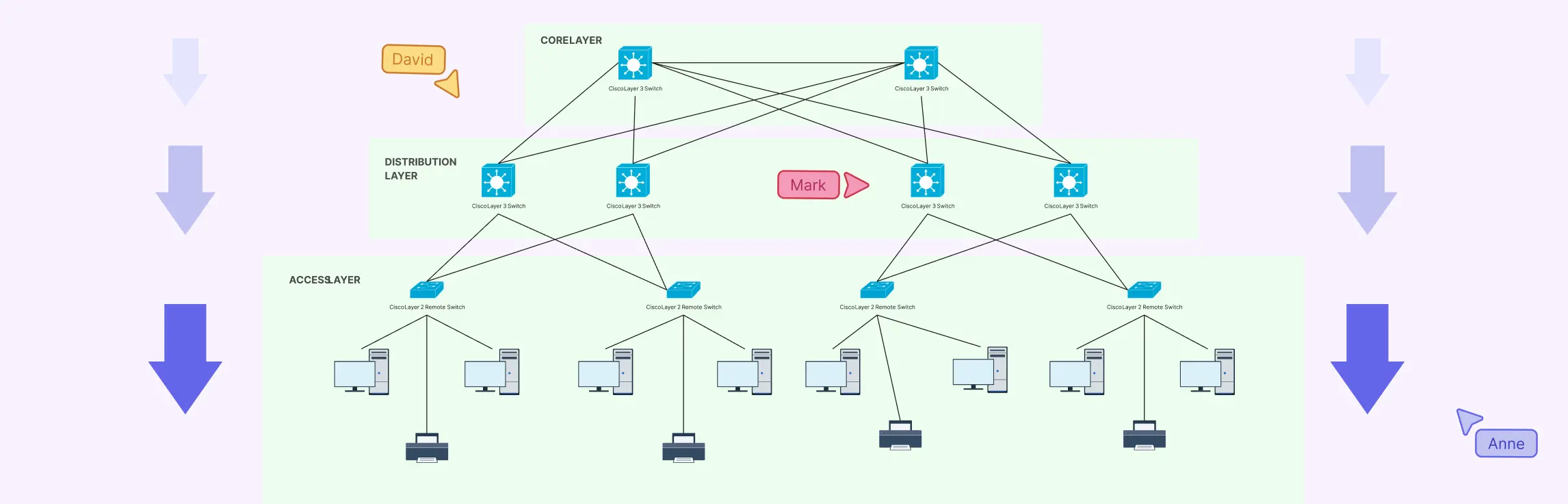
One of the biggest hierarchical network design benefits is how cleanly it breaks a complex system into manageable layers. Each layer has a clear responsibility, which reduces guesswork, speeds up troubleshooting, and makes the entire network easier to scale.
Let’s walk through the three core layers of a hierarchical network.
1. Access Layer: Where Users and Devices Connect
The Access Layer is the edge of the network, the point where people and devices actually connect and start communicating.
Role of End Devices and Edge Connectivity
This layer connects:
- Computers and laptops
- Printers and scanners
- IP phones and IoT devices
- Wireless access points
Its primary job is to provide reliable, secure access to the network while controlling who and what can connect. From an everyday user perspective, this is the layer that “just needs to work.”
Typical Components
Common components in the access layer include:
- Access switches
- Wireless access points
- Endpoints such as PCs, phones, and smart devices
Because this layer often contains the highest number of devices, clarity is crucial. A well-structured hierarchical topology diagram helps teams instantly understand where devices connect and how traffic enters the network.
2. Distribution Layer: The Control Center
If the access layer is where traffic enters, the Distribution Layer is where decisions are made.
Traffic Control, Routing, and Policy Enforcement
This layer:
- Routes traffic between access and core layers
- Enforces security policies and access controls
- Manages VLANs and subnet boundaries
- Filters and prioritizes traffic
It acts as the network’s traffic manager, ensuring data goes where it should, efficiently and securely.
Why This Layer Is Critical for Performance and Security
The distribution layer plays a major role in:
- Preventing bottlenecks
- Isolating network issues before they spread
- Enforcing consistent security policies
Without a properly designed distribution layer, even a powerful core can become inefficient or vulnerable. This is why many network issues can be traced back to unclear or poorly documented distribution-layer designs.
3. Core Layer: The High-Speed Backbone
At the top of the hierarchy sits the Core Layer, the engine that keeps everything moving.
High-Speed Backbone and Fault Tolerance
The core layer is responsible for:
- Fast, reliable data transport across the network
- Connecting distribution layers together
- Supporting redundancy and failover
Here, speed and availability matter more than complex filtering or policies.
Designing for Scalability and Uptime
A strong core layer is designed to:
- Handle large volumes of traffic without delay
- Remain operational even if a device or link fails
- Support future growth without major redesign
This is where long-term thinking pays off. When the core is built correctly, expanding the network becomes far less painful.
Hierarchical Network Topology Examples for Real-World Use Cases
Understanding hierarchical network topology is easier when you see it in action. Real-world examples show how the structure scales across different environments, improves performance, and reduces network headaches. Each example benefits enormously from a hierarchical network topology, which brings clarity and makes planning collaborative and visual.
Enterprise Office Network Example
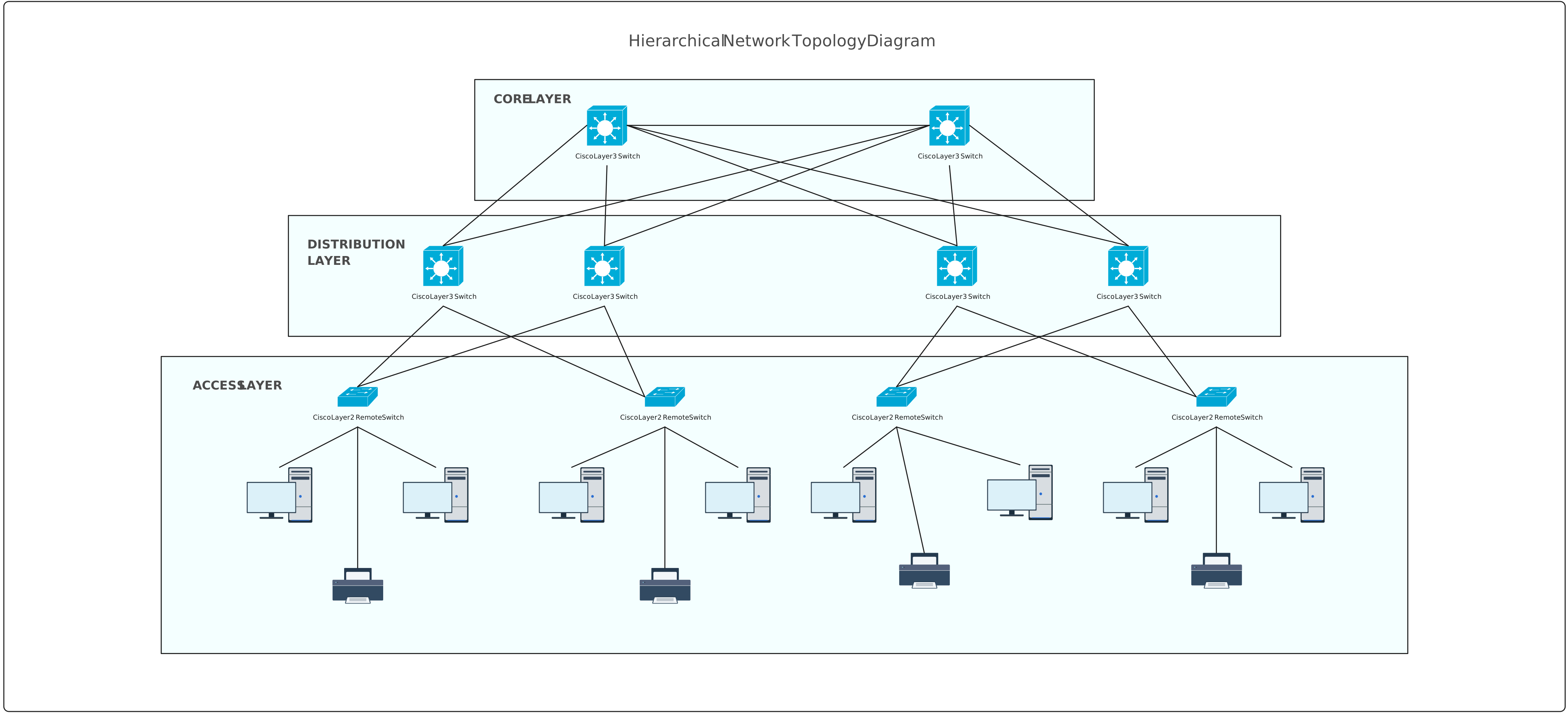
In a large office environment with multiple floors or departments, a hierarchical network ensures every team stays connected without chaos.
Key Features:
- Multi-floor or multi-department structure: Each floor or department connects through the access layer, feeding into a centralized distribution layer.
- Clear separation of layers: The access layer handles user devices, the distribution layer manages routing and policy, and the core layer provides high-speed backbone connectivity.
- Simplified troubleshooting: If a network issue occurs on a particular floor, it can be quickly isolated and resolved without impacting the entire office.
Visualizing this with a hierarchical network topology diagram helps IT teams understand exactly how traffic flows and where to add new resources.
Data Center Network Example
Data centers require high availability, redundancy, and performance, making them perfect candidates for hierarchical network design.
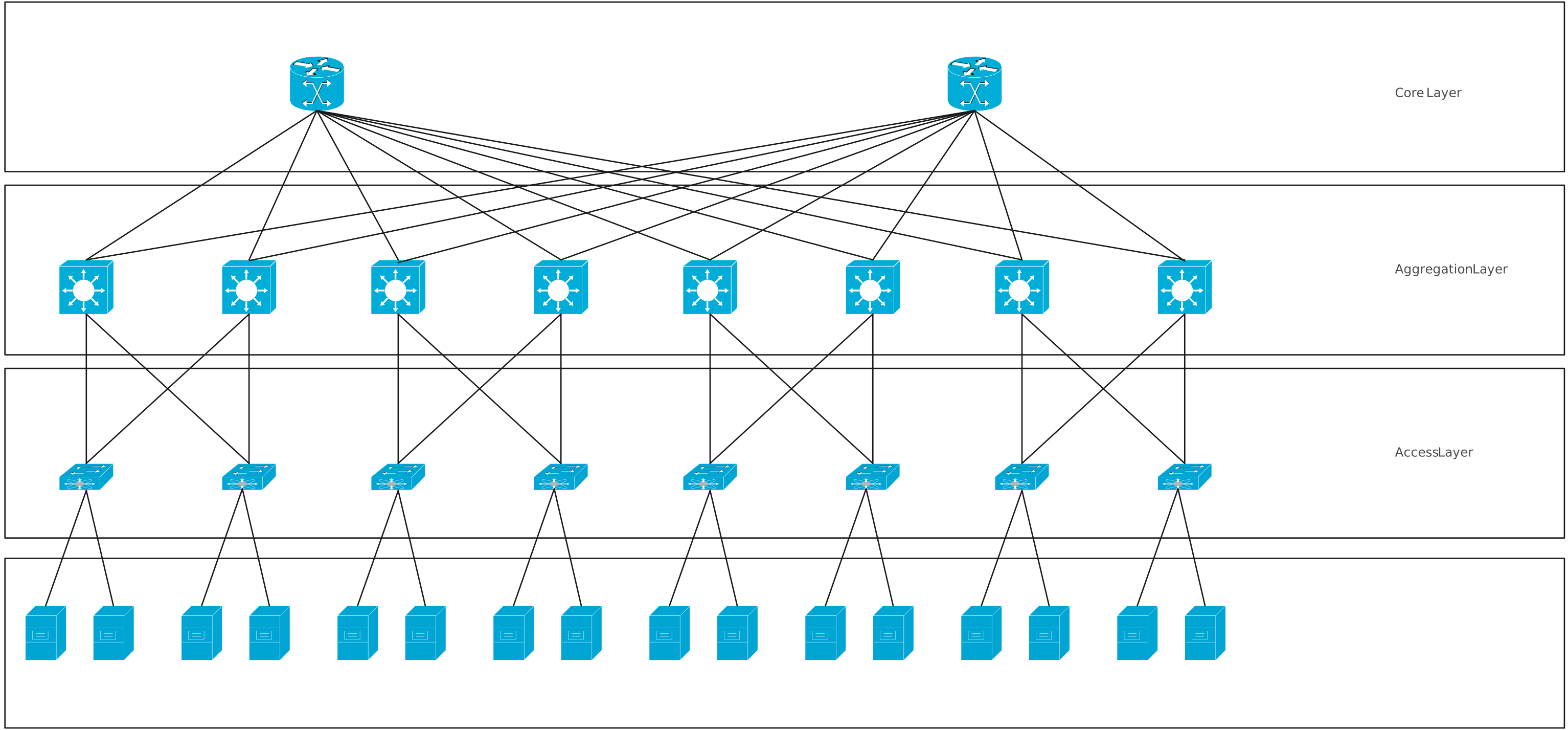
Key Features:
- High availability and redundancy: Multiple distribution and core paths ensure that if one link fails, traffic reroutes seamlessly.
- Traffic flow visualization: A hierarchical design helps engineers see which servers, storage units, and switches communicate and where potential bottlenecks could occur.
- Scalable expansion: New racks or clusters can be added at the access layer without disrupting the existing network backbone.
A hierarchical network topology makes planning and monitoring much easier, turning what could be a confusing tangle of connections into a clear, visual map.
Campus or Educational Network Example
Schools, colleges, and universities often span multiple buildings and require centralized network control. A hierarchical topology provides the structure they need.
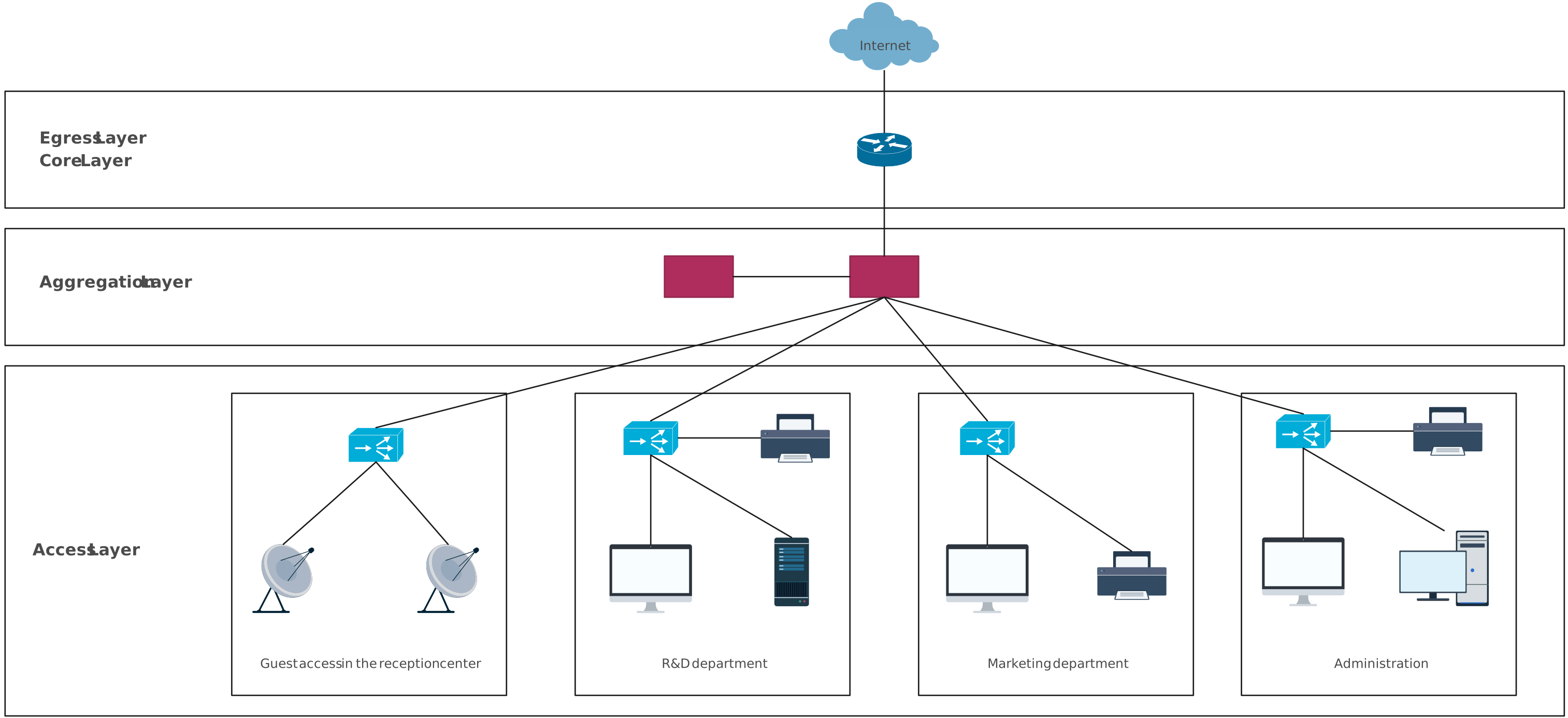
Key Features:
- Scaling across buildings: Each building’s network connects at the access layer, feeding into distribution switches that aggregate traffic for the campus core.
- Centralized control: Policies, firewall rules, and traffic management are applied consistently across the campus.
- Simplified network management: Maintenance, troubleshooting, and upgrades can be done building by building, layer by layer.
Using a hierarchical network topology diagram allows campus IT staff to plan expansions, manage security, and troubleshoot efficiently without getting lost in the complexity.
Advantages and Disadvantages of Hierarchical Network Topology
No network design is perfect, and that’s exactly why an honest breakdown matters. Understanding the hierarchical network topology advantages and disadvantages helps teams make confident decisions, avoid surprises, and design with intention.
Advantages of Hierarchical Network Topology
A hierarchical network topology brings structure to complexity. Instead of reacting to problems as they arise, teams gain a system that’s built to handle growth, change, and collaboration from day one.
Scalability Without Chaos
One of the biggest advantages is how easily a hierarchical network scales. New users, devices, or departments can be added at the access layer without disrupting the entire network.
Because each layer has a defined role, growth feels controlled, not chaotic. This makes hierarchical topology ideal for organizations that expect change but don’t want constant redesigns.
Easier Troubleshooting and Maintenance
When something goes wrong, structure becomes your best friend.
With a hierarchical design:
- Issues are easier to isolate by layer
- Changes can be made without affecting the whole network
- Maintenance becomes more predictable and less risky
Clear separation of responsibilities means faster fixes and fewer late-night emergencies.
Better Performance and Security Control
Hierarchical networks are designed for efficiency. Traffic is routed intelligently, policies are enforced consistently, and bottlenecks are easier to spot.
From a security perspective, this layered approach allows:
- Strong access controls at the edge
- Policy enforcement at the distribution layer
- High-speed, uninterrupted data flow at the core
Clear Ownership Across Layers
Another often-overlooked benefit is accountability. Each layer can be owned, managed, and optimized independently.
This clarity improves collaboration across IT and network teams; everyone knows where their responsibility begins and ends. And when paired with a well-maintained visual diagram, that shared understanding becomes even stronger.
Disadvantages of Hierarchical Network Topology
While powerful, hierarchical networks aren’t “set and forget.” Being aware of the limitations helps teams plan smarter.
Initial Design Complexity
Designing a hierarchical network takes more upfront thinking than simpler topologies. Decisions around layer roles, device placement, and redundancy need to be made early.
Without proper planning or clear documentation, this complexity can feel overwhelming at first.
Dependency on Core Layer Performance
Because the core layer acts as the backbone, its reliability is critical. If the core fails or becomes overloaded, large portions of the network can be affected.
This makes redundancy, fault tolerance, and clear visualization especially important at this level.
Higher Upfront Planning Effort
A hierarchical topology rewards preparation. Teams must invest time in:
- Thoughtful architecture
- Clear documentation
- Ongoing visibility into how layers interact
While this effort pays off long-term, it can feel like a hurdle for teams used to quick, informal setups.
A hierarchical network topology isn’t just a technical framework; it’s a way to bring order, clarity, and efficiency to modern networks. From the access layer, where devices connect, to the core layer that powers high-speed communication, each layer plays a critical role in keeping networks scalable, secure, and easy to maintain. By visualizing your network with diagrams, you can simplify planning, speed up troubleshooting, and align your team around a shared structure.
Stop letting messy network diagrams slow you down. With Creately, you can start designing clear, professional hierarchical network topology diagrams in minutes, giving your team the clarity and confidence to build networks that just work.
Helpful Resources
Learn how to draw a network diagram step by step, from planning what to include to laying out components clearly and choosing the right symbols.
Discover key bus topology diagram elements, highlight common design patterns, and point out the limitations you need to account for when working with this topology.
Understand how to approach Cisco network topology diagrams with confidence and create visuals that are practical, accurate, and easy to understand.
Learn how to create a home network setup diagram step by step, understand common layouts, follow practical best practices, and use free templates to map your setup.
Discover how to create a wide area network diagram step by step, understand key components, WAN examples, and follow proven best practices.
Explore what hybrid topology diagrams are, the hybrid types & examples, highlight advantages and disadvantages, provide a step-by-step creation process, and best practices.
Everything you need to know about LANs, from the basics and key components to network types, advantages, and best practices.